
Picture this. It’s Saturday night. I’m enjoying a couple of cold ones while catching up on social media while exporting match footage from the day’s match when I come across yet another post from Matt “Greybeard Actual” Little talking up Ace Virtual Shooting on “the Facebook”. He says, and I quote, “I’ve seen real skill improvements since making this a daily staple in my training regimen.” And of course, he recommends it.
Now this isn’t the first time I’ve heard good ole Greybeard praise Ace Virtual Shooting. I’ve heard it a good bit from him since the first time he mentioned it when we were in the same squad during the Primary Arms Space City Challenge in October of 2023 when, if memory serves me right, he was beta testing the system.
Nevertheless, I have been curious about Ace Virtual Shooting for about a year. Yet I’ve been leery of it because I’ve found that most of the high tech dry fire aids I’ve tried end up collecting dust after some time. The Mantis BlackbeardX was the only exception to this. That’s not to say the training aids aren’t valuable. Rather, I find myself coming back to the basic recipe of a shot timer, a cleared gun, and some reduced sized targets.
To make matters worse, the Ace Virtual Shooting software and hardware seemed more like a video game than a training aid requiring a notable monetary buy-in for those who don’t already own a Meta Quest 2 or Meta Quest 3 like myself. That’s right. It’s a virtual reality (VR) app.
Needless to say, the cold ones had lowered my inhibitions enough to look into what the buy in would actually look like. After adding it all up, I decided that taking the asking for permission route rather than the asking for forgiveness route with my wife would be the less turbulent journey. So I shut down the devices. Cracked open another cold one. Enjoyed a bit of the night air. Then called it a night.
The next morning, while out at breakfast with my wife, I made the procurement request. I fully expected it to be denied. Much to my chagrin, the request was approved. So I did what any other gun nerd would do and placed the order for a Meta Quest 3, an Ace Staccato P handset, and an Ace Virtual Shooting membership later that Sunday. By late the following Tuesday evening, everything had arrived and I was ready to rock and roll.
The Buy In
Technically speaking, the only requirements for the buy in are:
- A Meta Quest 3S (the Quest 2 is now out of production) or a Meta Quest 3 which come in at $300 (Quest 3S), $500 (128GB Quest 3), or $650 (512GB Quest 3)
- A 1-month subscription to Ace Virtual Shooting which comes in at $20; or a 1-year subscription which comes in at $168.
So if you already have a compatible Meta Quest, then you are looking at $20 or $168. Otherwise, you are looking at $320, $468, $520, $668, $670, or $818.
If you happen to be the type that takes issue with subscription based digital services, then you can technically cancel the monthly subscription and retain access to Ace Limited. According to the Ace FAQ at the time of writing, Ace Limited includes a basic range with various targets that can be used for dry fire applications. To be perfectly honest, I’d rather save my money and stick with doing dry fire the good old fashioned way which isn’t going to be entirely replaced by Ace Virtual Shooting anyway. More on that later.
So really you are looking at $20 per month or $168 per year if you opt for annual billing which I think is the better day.
After playing Ace Virtual Shooting with just the standard Quest controllers, I’m going to tell you that it is very awkward and provides very little value as a training aid. You can still work visual focus skills with the controllers, but that’s it. Frankly, there are better first person shooter games that are far more entertaining and provide visual focus skill development. So while technically an Ace handset isn’t required, I don’t see much of a point of buying without one. I suppose if one already has a Quest or has additional usage plans for one after acquisition, then maybe it might be worth trying a 1-month subscription to hedge against a buy-in that will end in regret later. But otherwise, you’re going to want an Ace handset which is going to run $200 for your choice between a Staccato P or an Arctus (which is very similar to a Sig P320).
That brings the recommended buy in for those with an existing Meta Quest to: $220 or $368. And for those without an existing Meta Quest to: $520, $668, $720, $868, $870, or $1018.
There are other optional Quest add ons that are likely going to end up getting purchased. These include:
- An aftermarket head strap cause the OEM one kinda sucks: $25-90
- A carrying case: $50-$130
- A charging dock: $70
- Prescription lenses: $50
So it’s worth planning for an additional $100-$350 beyond the obvious buy in.

That results in a grand total buy in of:
- $220 or $368 for those who already have a compatible Meta Quest, or
- Between $520 to $1368 for those without one.
Is it worth it? Let’s dig into it a bit more and perhaps find out.
The Software: Ace Virtual Shooting App
Let’s start with the software because the hardware (beyond the Meta Quest) is technically optional.
Now there is a companion mobile app for both iOS and Android. I don’t know about the Android one because I have an iPhone, but I can tell you that the iOS app is… well… pretty bad. I have a news feed which is pretty basic, but does a decent job of letting you know about new stages and version updates. There is a “social” feature which I haven’t figured out how to use since it either doesn’t work or Matt Little is ignoring my friend request. There is a stage library with a very basic search feature that is of little use since there doesn’t appear to be a way to save or queue up a stage to the main app. There is a gear list that tells you about guns and optics you can acquire using in-game currency. And finally, there is a profile feature. Perhaps there are plans to do more with the mobile app later, but as it stands it’s pretty basic, clunky, and not very useful.

Thankfully, the Ace Virtual Shooting app for the Meta Quest, which still has some rough edges and plenty of opportunities for improvement, is far better than the mobile app. When it loads, we start standing in the “hut” facing the back wall where we see two virtual apps on virtual TVs. The main one on the center of the wall is the primary game menu. Here we can see our rank, level, and currency. We can also access the settings, access help menus, video tutorials, and keep up with the news. We can also flip and scroll through various stages that we can go shoot. While there are some filtering and sorting features, finding the drill you want is a little tedious and the experience could benefit from a better search interface (which is a recurring theme).
The side vertical app provides access to the multiplayer features which I have yet to try since I haven’t connected with any friends yet.


Turning to the left we find our gun rack and workbench. The rack provides quick access to guns that have already been collected in their last configuration.
At the workbench, we can attach or detach a collected optic and apply a collected magazine configuration to the currently equipped gun.
Alternatively, we can use the screen above the workbench to use in-game currency, brass, to purchase one of the currently available eleven guns. Options include: a Sig P320 XFIVE Legion, a Staccato C2, a Staccato P, a SIG P365 XMacro Comp, a Shadow Systems MR920, a RIA 5.0E, a SIG P320 XCarry, a Staccato C, a JPL, a Walther PDP Steel, or a CZ Shadow 2 OR. As far as I can tell the gun is just a skin, they don’t behave any differently than the others. The exception to this is the JPL which is an Open division 2011 with a frame mounted optic which does appear to track like a frame mounted optic rather than the slide mounted optics on the rest of the guns.
Optics can be purchased with brass as well. There are a handful of Holosun, SIG, and Trijicon-esque (probably has something to do with brand licensing) optics. There is also a Shield Arms RMS available and the big ole Cyelee Bull. Window size matters in this game just as it does in real life.

Turning to the left again we find the door to the hut. To the left of it is a training tracking calendar and a little chalkboard showing you the number of rounds fired and money saved. It appears that the calculation is 30¢ per round. It really doesn’t take all that long for the trigger pulls to start adding up.


The range is a single pistol bay that uses one of four available environments. On the left side of the bay, we can see the current stages leaderboards. One leaderboard shows practice scores and the other shows ranked scores. Ranked scores, which cost one lead per attempt, are used to calculate your in game rank. Lead is a limited currency that is earned by participating in the daily and weekly drills.
A stage description is usually located on the left side of the bay as well. However, on some stages it is located on the right side.
Just behind us on the right side at about the 4:30 position is another virtual TV with the main application menu. This is convenient because it allows us to adjust settings and pick stages without having to head back to the hut.
As mentioned, I think the app could benefit from some interface refinements. Especially when it comes to finding drills and stages.
There are also several opportunities for improvement. For example, I wouldn’t mind having an option for switching between full VR and mixed VR on the stages. Having the targets scaled against the wall of my dry fire space would allow me to see how my hands interface with the gun and also allow me to look the handset (the virtual gun) back into the holster I am working with. I have no idea how difficult this would be to implement or if any other folks might find it useful, but I think it would help folks get better at holster work and build safe holster habits.
Another opportunity for improvement would be to add hand tracking to the app. I can deal with the floating gun, but it decreases the realism. That’s not the opportunity here though. Hand tracking might allow better interaction with the shot timer that is presently permanently affixed to the belt. With hand tracking we might be able to pick it up and look at it. Perhaps even configure par times and start delay settings. As it stands right now, the shot timer feature is of little use and value. Not to mention that having to manipulate the controller while it’s quite literally next to my outdoor plumbing is about as awkward as it gets.

The last thing I’ll mention in terms of opportunity would be the addition of stage creation or editing. I bring this up because I’m writing this review when my dry fire practice plan places a heavy emphasis on Gabe White’s four technical skills tests. Two of the tests are the Bill drill and Failure to Stop (or Mozambique) drill which are available in the stage library. However, the other two tests are not and it would have been awesome to be able to add them. There are a handful of other drills and qualification courses of fire that I wouldn’t mind adding to the app. This could be taken a step further by making drills shareable and discoverable by other users.
Don’t get me wrong. The app isn’t bad, but it could be better. It’s also fun to play.
The Hardware: Ace Staccato P Handset
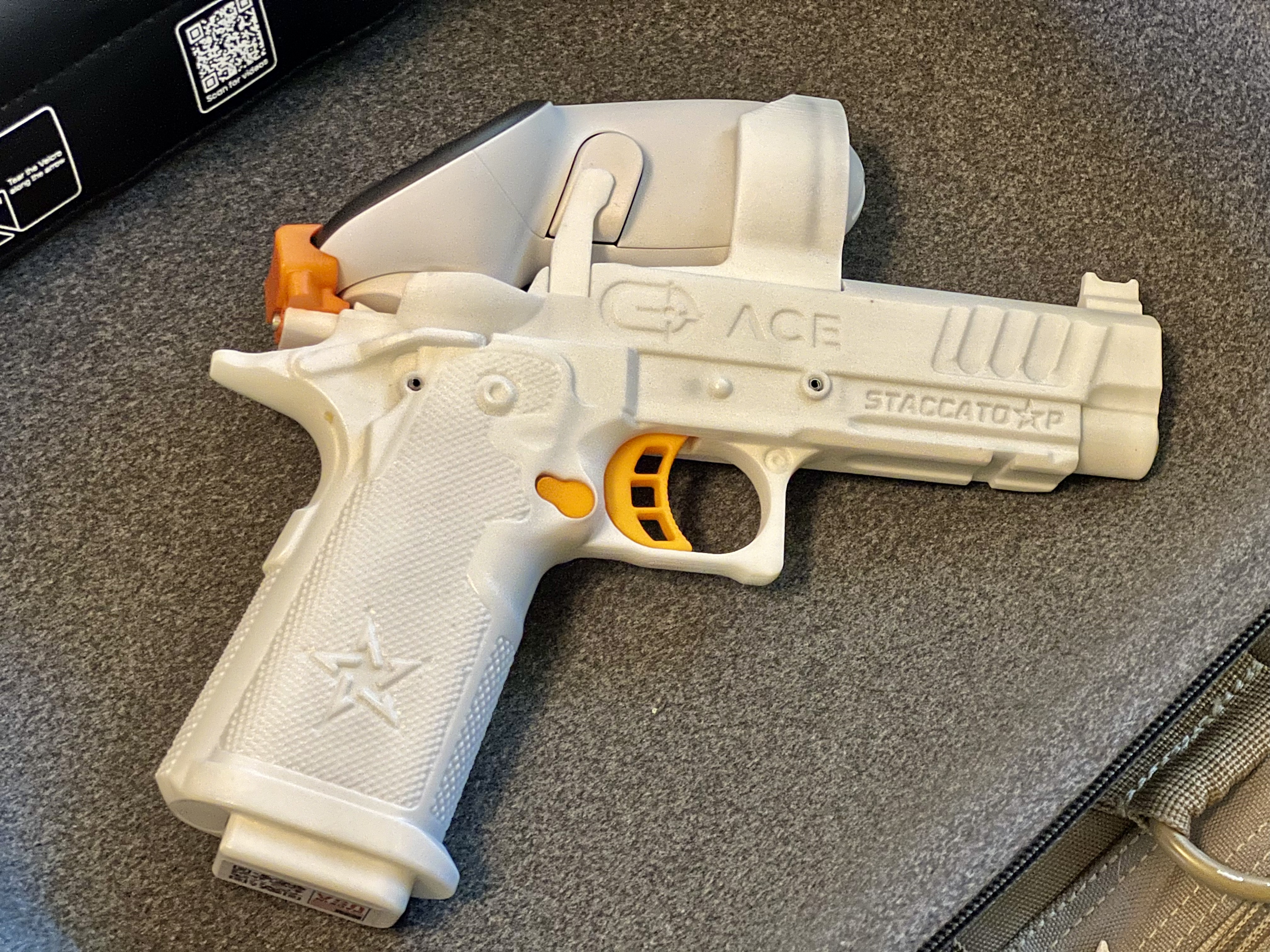
My first thought after opening the box that the handset came in and looking at it was along the lines of, “Oh, great. This is gonna be some janky Mattel toy level controller that is going to feel nothing like a real Staccato P.” I don’t know if it was the color, the orange controls, or something else. All I can say is that was the vibe that I got. Then I picked up and thought, “Well, son of a biscuit! I stand corrected. That’s pretty nice and reminds me a lot of the Staccato P.”

It’s not identical, but it’s pretty dang close. The first difference I noticed was the grip texture. The texture on the Ace handset is nice, but it’s not the same as the texture on the P. It’s actually quite different.
The grip safety is not functional. The dimensions for an engaged grip safety are right, but it doesn’t actually actuate. This is not a huge deal, but the trigger will work even with a messed up grip and insufficient grip pressure. Now that messed up grip and lack of grip pressure will reflect on the stage scores, but a soft “dry fire grip” is a bad habit that is easy to pick if it isn’t guarded against. I would welcome a functional grip safety very much.
The magazine well doesn’t have the same dimensions as the magazine well on the P. This doesn’t bother me since the magazine is fixed. Meaning nothing falls out when the magazine release button is pressed. That means that one can’t practice reloads in earnest. Dropping magazines without being able to see them since we are immersed in full virtual reality is probably a bad idea anyway. Not to mention that we can’t look a magazine into the magazine well since we can’t see the magazine or our hands. This is yet another reason I would like to see stages have the option of being projected in mixed reality mode.
Reloads are simulated by pressing the magazine release button and smacking the bottom of the handset. This isn’t terrible, but I’m not a fan since I’m going to have to guard against that becoming a de facto subconscious response to a reload. I can see it now. I’m going to be at a match in real life and when it’s time to reload I’m going to press the mag release button, slap the mag well, and try to keep going like a complete buffoon.

And then there is the trigger, which is not a 2011 trigger. First of all it’s hinged which changes the feel of the trigger all together. It also has about two to three times as much pre-engagement travel before hitting the wall. It’s not all bad though. The break is nice. Like a crisp carrot snapping in half kind of nice. It has almost zero over travel. The reset is just as short as the over travel and definitely tactile. Depending on where the finger is placed the break comes in at just under 3.5 lbs to just over 3.5 lbs. While it’s not a 2011 trigger, it is very easy to live with and to work.
A manual safety that can actuated would also have been a nice touch to help burn in safe manual safety disengagement practices.


Okay. So the Ace Staccato P handset isn’t identical. However, it’s very close. So close in fact that it fit nicely in the gamer holsters. It specifically fit in the Double Alpha Flex race holster and the Weber Tactical USPSA holster. However, there is no way the handset will go into any of the inside-the-waistband (IWB) holsters I tried to fit it into. Which is fine since the attached Meta Quest controller would have been really awkward to stuff inside the waistband anyway.
The handset significantly elevates the Ace Virtual Shooting experience. Especially when used in conjunction with a holster. It gives it a much more realistic feel than using the standard controller. In my opinion, $200 for the handset is money well spent just in terms of entertainment value. Not to mention there is also dry fire training value that we will get into in the next section.
One final thing that bugs me about the controller and game that I think can be fixed if the good folks at Ace ever decide to introduce hand tracking support is that pretty much all of the menu selections and app interactions outside of shooting a stage are done via trigger manipulations with a pointed gun. Yes, I get it. It’s not a real gun. And I know we are doing this in the context of a VR app. However, it normalizes a behavior that should be otherwise avoided because doing it with a real loaded gun can have serious consequences. Some folks will point out and argue that dry fire practice does the same thing. Furthermore, unintentional discharges in dry fire are a real thing. To those folks I offer a “yes, but”. Yes, but trigger manipulations are only done while simulating intentional shooting and the unintentional discharges is why having a pre-practice ceremony to ensure the gun is unloaded and cleared prior to beginning practice matters (a BarrelBlok is also a good idea as an added precaution). At any rate, all I’m saying is that I would rather not point and shoot at menu selections and hand tracking might be a good alternative.
All nitpicking aside, the handset is pretty awesome. The game is fun. And I’m going to keep playing it even if it doesn’t pay the real skill improvement dividends that Matt Little is seeing (but I think it will).
Value as a Dry Fire Training Aid
First off, Ace Virtual Shooting is not a replacement for plain old dry fire practice, but I believe it can supplement dry fire significantly. There are just some things you can’t do in Ace that can be done in traditional dry practice. Things like manipulating the manual thumb safety, practicing reloads, and looking the gun back into the holster. Additionally, we want to maintain recent familiarity with the real gun. This is even more important if the gun one uses for defensive or competitive applications is not replicated by the handset. Lastly, the drill we may want or need to practice may not be available in the app.
That said Ace can aid the development of visual related skills more effectively than traditional dry fire. The simulated optic and iron sight movement during recoil will work visual patience, visual confirmation, and shot calling ability harder than traditional dry fire will. Furthermore, it will keep you honest when the hits are scored on the target or the steel doesn’t fall. It gives you the target feedback that we normally only get from live fire practice without having to tape and reset targets between strings. The target confirmation feedback truly is pure dry fire gold.

We can pretty much do all the other dry fire things in Ace Virtual Shooting. Want to work on your draw and presentation? No problem. Want to work target transitions? Go for it. Want to develop that sub two-second Bill drill? Go ham. Want to tune up for this weekend’s local Steel Challenge Match? Yup, you can do that too. But you will have to guard against internalizing the simulated reloads and normalizing questionable gun handling.
Can you do all that with traditional dry fire? Of course you can! But you’ll have to set up your own targets and won’t get target impact verification.
Verdict
You’ll have to come up with your own verdict. All I can tell you is that at this very moment, I am happy with the purchase and see myself using it on a daily basis for the foreseeable future.
Do I recommend it? Yes, but. The buy-in is high. Additionally, I can see folks who are early in their development of marksmanship skills getting frustrated with the app due to poor presentation or having trouble getting back into the holster. There is something about being able to see your hands and your holster that facilitates the process of building and refining the proprioceptive indexes needed for consistent pistol presentations and holster work. As such, I would urge those who are in their early stages of marksmanship development to use that budget for attending quality training that will help them improve traditional dry fire practice before taking the plunge into Ace Virtual Shooting.
If you do end up taking the plunge and getting into it, then look me up in Ace and lets do some head-to-head drills.
One response to “Ace Virtual Shooting”
[…] might seem a little silly that I’m revisiting Ace Virtual Shooting only a few weeks after publishing the first impressions review of the system. However, several […]